


Scan to BIM cost is essential to understand when planning a renovation, retrofit, facility upgrade, or existing-building documentation project. Before getting a quotation for this process, there are certain things that project owners and professionals must know about the factors affecting Scan to BIM pricing and the level of detail needed in the model.
Scan to BIM is a process of transforming scanned information about a building into a Building Information Model through software such as Autodesk Revit. The overall cost will depend on many other factors aside from the area of the building. These include architectural complexity, structural condition, mechanical, electrical, and plumbing (MEP), point cloud quality, Level of Development (LOD), and timelines.
For example, creating an architectural as-built model of an open commercial space generally requires less effort than modeling a hospital mechanical room containing dense ductwork, piping, equipment, and concealed building services.
This blog actually highlights the critical factors that influence Scan to BIM costs, compares the most popular pricing strategies, and offers a real-world model for budgeting your project.
What Drives Scan to BIM Cost?

The Scan to BIM cost is the cost associated with obtaining scan data, manipulating it, creating the BIM model, and ensuring that all the work done satisfies the available information.
A Scan-to-BIM project may include two separate services:
- 3D laser scanning: Capturing an existing building and creating a point cloud.
- BIM modeling: Converting the point cloud into an intelligent, coordinated digital model.
If you already have a usable point cloud on file, you will only need to use the modeling service. In case you need to acquire a new site, your quotation should include fieldwork, registration, data processing, and site logistics.
The primary cost factors include:
Cost factor | How it affects pricing |
Building area | More time is needed for modeling larger areas, but the rate may reduce with size. |
Building complexity | Complex shapes, limited access, and detailed architecture make the job harder. |
Modeling discipline | Architecture, structure, and MEP have different modeling requirements. |
Level of Development | Higher model detail and reliability requirements generally increase production and QA time. |
Point cloud quality | Insufficient data, noise, and registration may need more processing or field work. |
Delivery schedule | A shortened timeline will demand extra inputs or concurrent production. |
Revisions and QA | Review cycles, deviation checks, and extra deliverables influence the total charge. |
The most reliable way to estimate Scan to BIM cost is to define these variables before comparing vendor proposals. A per-square-foot rate becomes meaningful only when the scope, modeling requirements, and deliverables are clearly specified.
How Building Area, Complexity, and Discipline Affect Pricing
Size of the building is definitely an important starting point, but it is far from the entire picture. Two buildings that have identical square footage can still be quite different in terms of the modeling work that will be required.
Building area
A 50,000 square feet commercial building involves a lot more modeling efforts as compared to a 5,000 square feet office building having a similar plan. But on the other hand, there can be economies of scale involved as the setup and other modeling efforts can be spread over a wider area.
Also, small-scale projects might be required to pay a minimum fee owing to the requirement for setup and quality controls irrespective of their size.
In the process of computing your building area, ensure that the stated figure is for gross floor area, net floor area, chosen rooms, individual floors, or just the areas modeled.
Building complexity
The complexity of the job determines how much effort is spent on modeling and interpreting for each square foot.
The following can be factors that may result in expensive projects:
- Walls, curvatures, and special architectural features.
- Buildings with elaborate details and inconsistent geometries.
- Different floor levels, mezzanine floors, and inaccessible areas.
- Lots of ceiling cavities and services.
- Limited accessibility to the site or operational limitations during scanning.
- Incomplete scans or areas that are occluded by furniture and machinery.
It means that a massive storage building with a simple structural design can be easily modeled compared to a smaller medical facility with many service connections.
Architectural, structural, and MEP modeling
Discipline is among the main variables in the process of Scan-to-BIM.
In architectural modeling, there may be walls, floors, ceilings, doors, windows, stairs, roof, and many more components. It is based on the geometry, openings, finishes, and details required in the model.
In structural modeling, there may be columns, beams, slabs, braces, visible foundations, and any other structural components. Existing buildings can create difficulties if the connections are not visible and if the point cloud does not capture the whole geometry.
MEP modeling is the analysis of mechanical, electrical, and plumbing systems that includes ducts, pipes, cable trays, conduits, devices, and connections. Complex MEP areas will need much interpretation and coordination.
Modeling scope | Typical effort profile |
Architecture only | Lower to moderate, depending on geometry |
Architecture and structure | Moderate, depending on structural complexity |
Architecture, structure, and MEP | Moderate to high |
Dense MEP or plant rooms | High to very high |
These are categories of work done rather than pricing bands. For even a basic structure, there can be complex modeling work involved in order to ensure accuracy and knowledge about the parts.
How LOD 200, LOD 300, and LOD 350 Affect Scan to BIM Pricing
Level of Development (LOD) defines the level of development and reliability of BIM objects on an individual basis. LOD helps the project team define the content of the model element and its usage.
Level of Development Specification by BIMForum defines the industry standards regarding the definition of model element content and reliability. It also comprises LOD 250 in its version 2025.
It should be understood that LOD is not just a matter of visual detail. The geometry and definition of elements have to be defined for the project.
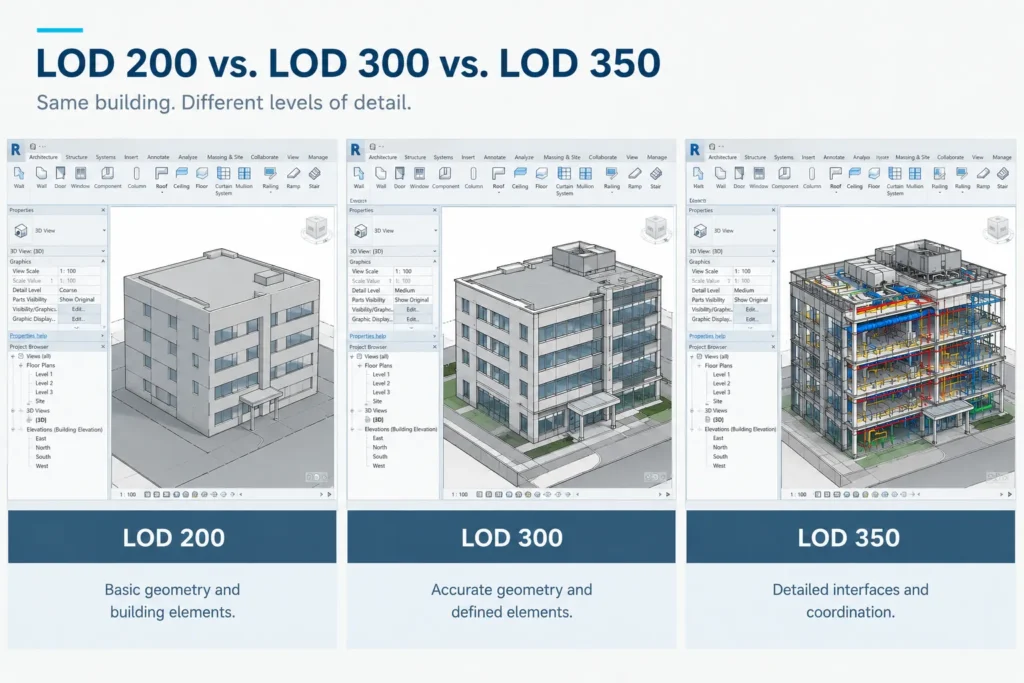
LOD 200: Approximate geometry
LOD 200 would be sufficient for the project if it only needs an overall view of the building components.
As the scope is already decided, depending on that scope, the model could have basic representations of the walls, floor, structure, surface, and building systems.
Possible uses:
- Planning for renovations.
- Space planning.
- Feasibility studies.
- Building layouts.
Should LOD 200 be able to deliver approximate representations that meet the requirements of the project, this LOD will help save time and effort spent on modeling.
LOD 300: Accurate geometry
The LOD 300 will be able to represent elements that have been specified in terms of size, shape, location, and orientation.
Whereas in Scan-to-BIM applications, this would mean representing the dimensions and locations of architectural, structural, and MEP elements to the required tolerance level.
Potential applications:
- Existing-condition documentation.
- Renovation and retrofit design.
- Architectural and structural design coordination.
- Quantity-related workflows where model reliability is appropriate.
- Design development based on verified site conditions.
For LOD 300 level, there is usually a need for more modeling and validation compared to the approximate model since elements need to be created and validated.
LOD 350: Detailed interfaces and coordination
The LOD 350 will provide details about interfaces between building components and other systems. These requirements change according to the specific needs of the model component and the project.
For example, an MEP coordination model should be able to include connections between ducts, piping, equipment, supports, and the surrounding construction.
Possible uses of LOD 350:
- Detailed MEP coordination.
- Clash detection and constructability analysis.
- Complex renovation projects.
- Coordination of building systems with structural/architectural elements.
LOD 350 does not automatically imply fabrication-level modeling. The requirements for fabrication level have to be explicitly stated.
LOD comparison for estimating cost
Requirement | LOD 200 | LOD 300 | LOD 350 |
Geometry | Approximate | Defined and accurate to the specification | Defined geometry with additional interface detail |
Element representation | General | More precisely developed | More detailed where interfaces matter |
Typical modeling effort | Lower | Moderate | Higher |
Potential use | Early planning | As-built documentation and design | Detailed coordination |
Main cost consideration | Required coverage and basic geometry | Element accuracy and verification | Interfaces, system density, and coordination |
As a general rule, the higher the level of effort required for development and validation of a model, the more expensive it will be. But there is no universal ratio for increase between LODs. It depends on building specifics, discipline, exclusion from modeling and other factors.
How Point Cloud Quality and File Size Affect Pricing
The quality of the point cloud is an integral part in determining the ability of a modeling team to understand the state of a building.
If the point cloud is clean and well-registered with sufficient coverage, then it is easier to recognize walls, doors and windows, structural elements, building services, and equipment.
Point cloud quality
A few factors may cause an increase in modeling work:
- Coverage deficiency: The absence of covered parts may necessitate assumptions, exclusions, or more scanning of the site.
- Occlusions: Obstacles such as furniture, stock of materials, ceiling, and equipment may cover significant geometrical objects.
- Registration problems: Divergence in scans may produce discrepancies in overlapping scans.
- Presence of noise and outliers: The extraneous points may have a bearing on the discovery of the objects.
- Density deficiency: Small and fine elements may not receive adequate representation.
- Coordinates ambiguity: Lack of coordinate information may impact model alignment.
The modeling company needs to examine the point cloud prior to offering a price quote, particularly for complex retrofit or MEP projects.
File size and processing requirements
While large point clouds take up more space, memory, processing power, and data management work, it is not just the size of the file that defines the cost of the modeling process.
A large, cleaned point cloud of a relatively simple building may be easier to model than a small one that covers a complex mechanical area with many services.
To receive a more accurate estimation, you should give your vendor the following information:
- Point cloud format, e.g., E57, RCP/RCS, etc.
- An approximate file size and number of scans, if possible.
- Is the point cloud registered and cleaned?
- Coordinate system information available.
- Areas where the coverage is poor.
- Modeling accuracy and its verification method.
In case your data is incomplete, request the provider to exclude the costs of registration, cleaning, and rescan from the BIM modeling price.
How Turnaround Time and Revisions Affect the Price
The delivery schedule will impact the way the Scan to BIM process is staffed and managed.
The standard delivery schedule will allow the time for modeling, review, coordination, and corrections. The fast-tracked delivery schedule may require additional modelers, more workflow stream parallel working, increased reviews, or work overtime.
However, rush pricing cannot be guaranteed. The effect of it is affected by how available the resources are and how much work can be done simultaneously.
File size and processing requirements
- Total modeling area and number of floors.
- Level of detail required and number of disciplines.
- Condition of point cloud and data processing.
- Availability of reference plans and specifications.
- Required QA steps and client review points.
- Number of deliverables and file formats.
Revision scope
The cost of revisions will vary depending on what is changed following the first submission.
For instance, fixing an item that does not fit the agreed-upon specification is not the same as introducing an extra discipline or modifying the model from LOD 200 to LOD 300.
Before agreeing on a proposal, make sure that you understand the following:
- Number of review cycles.
- Revisions to the agreed-upon scope of work.
- How extra modeling charges are billed.
- Are there any extra expenses related to changes in design and additional scanning data?
- Who gives approval of the model during milestones?
This will prevent any issues in the future about the scope of work.
Fixed-Fee vs. Per-Square-Foot Scan to BIM Pricing
Common forms of vendor pricing include fixed-price, per square foot, or time. It all depends on whether the scope can be accurately established before production.
Per-square-foot pricing
The vendor applies an agreed rate to the defined area.
Example:
Suppose a project covers converting a point cloud to a 3D Architectural model of 20,000 square feet, and the agreed modeling rate is $ x per square foot. The per-square-foot pricing model is most appropriate when the size, scope of modeling, LOD, and exclusions are well-defined.
Advantages:
- It makes budget calculation easier
- Projects with similar scope are easily comparable.
- It is also efficient for repeated tasks and large areas.
Limitations:
- May not account adequately for dense MEP areas or intricate geometry.
- Can obscure minimum fees or exclusions.
- May create disagreements if the area measurement is not defined.
Fixed-fee pricing
The total cost is provided by the service provider for the specified scope of services.
For instance, the fixed-price proposal can involve designing the architectural and structural model for commercial renovation based on the provided point cloud and with an agreed LOD, Revit deliverable, and review cycles.
Advantages:
- It makes budget clear.
- It makes cost estimation and procurement easier
- The cost is predictable for a stable model.
Limitations:
- Demand for more services may lead to order changes.
- Misinformation or undefined information may lead to disagreements
- Changes in scope can influence the agreed cost.
Time-based pricing
Hourly and daily basis charges are reliable and justified if the cloud data is incomplete, the model requirements are unclear, and the when the project requires some exploration before knowing the scope.
In order to mitigate risks, request the estimated number of hours, the not-to-exceed number of hours, and a process for approving more work.
Which pricing method should you choose?
Project condition | Pricing approach to consider |
Clearly defined scope and stable deliverables | Fixed fee |
Repetitive areas with consistent requirements | Per-square-foot pricing |
Uncertain scope or incomplete source data | Time-based or phased pricing |
Complex MEP or highly variable building conditions | Fixed fee with explicit scope boundaries, or a phased estimate |
Regardless of the pricing model, compare proposals based on equivalent deliverables rather than the headline price alone.
How to Get an Accurate Scan to BIM Quote
An RFP that is well thought out helps the providers to estimate the work properly and avoid surprises on cost. Instead of asking just “How much does Scan to BIM cost per square foot?”, give them all the information they need to do their analysis on the real effort involved.
Step 1: Define the project and intended use
Describe what the model will be used for, such as renovation design, existing condition modeling, MEP coordination, facility management, etc.
This will determine what has to be modeled and how accurate the geometry needs to be.
Step 2: Specify the building area
Indicate the total area, number of floors, and the particular rooms or zones covered by the scope.
In case the project involves more than one building, state the individual buildings.
Step 3: Define the required disciplines and LOD
Indicate if you need architecture, structure, MEP, or integrated modeling.
Identify LOD 200, LOD 300, LOD 350, or a particular LOD requirement for an element that corresponds to your project’s intended purpose. If you are unsure about this, let the vendor advise you on the appropriate scope.
Step 4: Share available scan data
A sample or example of the point cloud should be provided whenever possible.
The file type, registration status, approximate size, coordinates, and any coverage issues should be included.
When a new scan is required by the vendor, the location, availability, timing, and information that need to be scanned should be stated properly
Step 5: List the deliverables
Validate the required outputs, which include the following:
- Revit model and version.
- Point clouds, if required.
- Architectural or MEP views, plans, sections, and elevations.
- Model element categories and exclusions.
- Alignment and tolerance.
- QA documentation, if required.
- IFC or other formats, if required.
Do not assume every Scan-to-BIM proposal includes drawings, the original point cloud, clash detection, or a formal QA report.
Step 6: Agree on deadlines and revisions
Milestone dates, review cycle duration, number of review cycles done, and approval process for future tasks should be listed.
Step 7: Compare quotations on the same basis
Ask every supplier to provide a breakdown of the prices involved for scanning, point cloud processing, BIM modeling, and QA, among others.
Also factor in the underlying assumptions, exclusions, minimum fee, change order process, and revision process when selecting your service provider.
A low bid may indicate a small scope rather than good value. The right bid should be one that satisfies your needs and limitations.
Conclusion: Estimate Your Scan to BIM Project With Confidence
The scan to BIM pricing will depend upon the effort involved in converting the existing condition to a digital model. Building size will definitely matter, but project complexity, disciplines, LOD, point cloud quality, turnaround time, and revisions can affect the price just as much.
In order to make a realistic budget, one has to understand the purpose of the model, its level of development, the disciplines that need to be modeled, and supply enough source data to the vendor. Do not compare the quotes on a per-square foot basis.
If you are going to renovate, retrofit, or document the existing building, Cresire Consultants will help you evaluate your Scan to BIM requirements and define the modeling scope. Supply us with your building area, point cloud data, disciplines, and the purpose of the model.
FAQs About Scan to BIM Cost
How much does Scan to BIM cost per square foot?
There is no standard price for Scan to BIM services that would be applicable universally. It depends on the size of the building, complexity, LOD of the model, discipline, quality of the scan, and other factors. The model of architecture alone might take way less time than a complex MEP coordination model.
Is laser scanning included in Scan to BIM pricing?
This is not always the case. While some will quote you for laser scanning and BIM modeling separately, there are other service providers who will provide both at one cost. It is important to inquire if the price quoted is inclusive of everything else.
Why does LOD 300 cost more than LOD 200?
LOD 300 will always take more time to develop in terms of geometry and verification compared to LOD 200. This depends on the type of elements being modeled and how they are going to be used. The cost is variable depending on the LOD required for the particular project.
Does MEP Scan to BIM cost more than architectural modeling?
The MEP modeling process can sometimes be more demanding due to the fact that the ducts, pipes, conduits, equipment, and their relative positioning may be quite complicated. Yet, how expensive it is going to be will depend on the complexity of the system itself.
Can I reduce Scan to BIM cost without compromising quality?
Certainly. Clearly define the intended use of the model, do not include unnecessary details in the model, provide clean and registered point cloud data, clearly state what is excluded, and agree on deliverables before starting. Choosing the right LOD for each type of element could be useful to save money.
How long does a Scan-to-BIM project take?
It all depends on the size of the building, number of disciplines, LOD level, status of the point cloud, and review requirements. A small architectural model might be done faster than a big MEP model. Contact the provider to get an estimate after analyzing the scope and scans.
What information do I need to request a Scan to BIM quote?
Provide the square footage of the building, the building type, the required disciplines, the desired LOD level, whether there is any point cloud data and in what format, the modeling tolerance, the deliverables, and the desired completion date. Sample scan data or reference drawings can also be provided.
NDA available