


4D BIM Scheduling & Construction Simulation Services
4D BIM combines 3D models with construction schedules to visualize project sequencing, monitor construction progress, review site logistics, and identify time-based coordination issues. CRESIRE’s 4D BIM Scheduling Services support more informed planning and smoother project execution.
- 3D BIM to 4D schedule integration
- Construction sequencing & phasing
- Navisworks 4D simulation
- Planned vs. actual progress tracking
- Site logistics & construction planning
- Model-based sequence validation
- Project-specific QA/QC
150K+
Sq Ft Modeled
100+
Projects
92%
Repeat Client
Trusted by AEC Professionals






What Is 4D BIM Scheduling?
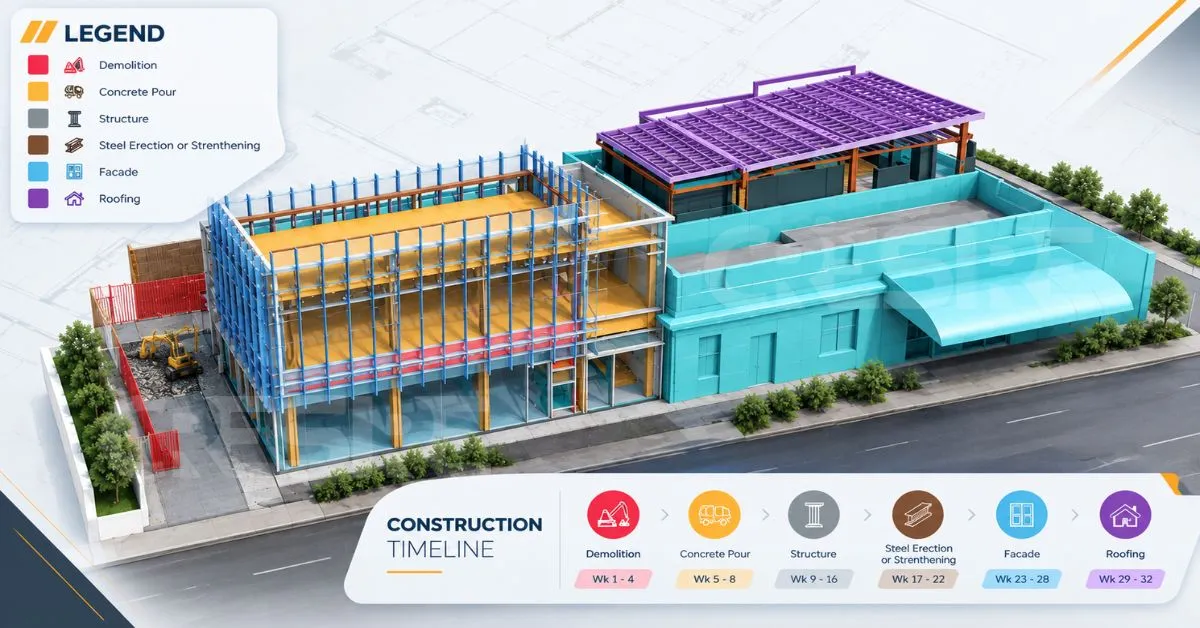
4D BIM adds time and construction sequence information to a 3D model. Instead of reviewing a Gantt chart separately from the 3D Revit model, project teams can link project schedule activities to corresponding model elements and visualize their planned construction activities that are planned on site.
A 4D BIM Scheduling allows the team to see those activities taking place within the actual project environment.
This makes it possible to examine questions that are difficult to answer from a schedule alone:
- Are several trades scheduled to work in the same area at the same time?
- Is there sufficient access for equipment during a particular phase?
- Does the planned sequence make sense spatially?
- When does temporary access need to be installed or removed?
- Are material movement routes available when required?
- Will one activity prevent another from starting?
- Does the planned sequence match the way the project can realistically be constructed?

The value of 4D BIM therefore goes beyond visualisation. It provides a way to test the relationship between time, space and construction activities before those activities take place on site.
Our 4D BIM Scheduling Services
We tailor the 4D workflow around your existing model, schedule and project objectives rather than forcing every project into the same process.
We take your existing BIM model and prepare it for schedule integration. Depending on the project, this may involve reviewing model structure, disciplines, levels, elements and geometry so that the model can be effectively linked with construction activities.
We can work with models originating from Revit, IFC and other compatible formats, subject to project requirements and model quality.
We link construction activities to relevant BIM model elements and simulate the planned construction sequence to create a visual representation of project execution. This enables project teams to review construction phases, structural sequencing, trade progression, floor-by-floor development, area-based workflows, installation activities, demolition works, temporary structures, and handover stages within a coordinated environment. By visualizing the schedule in a model-based format, stakeholders can better understand project timelines, evaluate sequence relationships, and identify activities that may require further coordination or review before construction begins.
A 4D simulation visually represents how a construction project progresses over time, helping teams understand activity sequences and construction phases. It can support planning, client presentations, progress meetings, tender presentations, stakeholder communication, and sequence validation. By linking the project schedule with the 3D model, 4D BIM helps teams communicate timelines, review construction strategies, identify sequencing issues, and improve overall project coordination.
If you already have a construction schedule, we can integrate its activities with your BIM model. We work with Primavera P6, Microsoft Project, and CSV/Excel data, including activities, durations, dates, dependencies, milestones, phases, and trade activities. We also review the schedule structure when needed to ensure accurate model-to-activity linking and reliable 4D BIM output.
4D BIM is particularly useful for coordinating construction activities that compete for the same physical space, such as material storage, site access, crane operations, equipment movement, work zones, and temporary routes. By linking these site logistics to the construction timeline, teams can visualize how site conditions will change and plan activities more efficiently.
4D BIM Scheduling Workflow
Our workflow combines the BIM model, construction schedule and project requirements into a coordinated 4D environment.
Review the BIM Model
Review the Construction Schedule
Prepare the Model for 4D
Link Model Elements to Activities
Develop the 4D Simulation
Review Construction Logic
Refine & Deliver
What We Look for During 4D Construction Sequencing
A 4D simulation becomes more valuable when it is used to ask practical construction questions.
Trade Stacking
Are too many trades scheduled to occupy the same work area at the same time?
Access Conflicts
Does an activity block an access route required by another trade?
Equipment Conflicts
Will cranes, hoists or construction equipment be available when the associated installation activity begins?
Material Movement
Are there suitable routes for moving materials into the work area during each phase?
Temporary Works
Do temporary structures, access arrangements or protection measures need to be installed before a particular activity?
Construction Dependencies
Is an activity scheduled before the work that needs to precede it has been completed?
Spatial Constraints
Does the sequence work with actual site conditions? This is what separates 4D BIM scheduling from simple construction animation.
4D BIM Scheduling vs. Construction Animation
A construction animation can show a building appearing over time. That does not necessarily make it a 4D BIM workflow.


Where 4D BIM Can Improve Construction Planning
Commercial Construction
Infrastructure Projects
Industrial Projects
Healthcare Projects
Renovation & Phased Construction
High-Rise Construction
Integrating Construction Schedules with Navisworks
Navisworks allows construction teams to connect a project schedule with the 3D BIM model and visualize how the building is expected to progress over time. Schedule activities are linked to corresponding model elements, creating a time-based simulation of construction sequencing.
We can work with schedule information from:
Primavera P6
Primavera P6 schedules can provide the activities, work breakdown structure, durations, dependencies and milestones needed to build a detailed 4D simulation in Navisworks.
Microsoft Project
Microsoft Project schedules can be structured and linked with BIM model elements in Navisworks to visualize planned construction activities and project phasing.
Excel / CSV Schedule Data
For projects where the construction programme is maintained in Excel or CSV format, structured activity data can be used for model-to-schedule linking and 4D simulation.
Model-to-Schedule Linking in Navisworks
The key step is connecting schedule activities with the relevant BIM elements. In Navisworks, these relationships can then be used to simulate construction sequences, review phasing, and identify potential sequencing or coordination issues before construction begins.
Software Expertise
Our 4D BIM Technology Stack
Autodesk Revit
Expert · 2018–2026
Navisworks Manage
Expert
CSV / Excel
Expert
Microsoft Project
Expert
What We Need From Your Team
A successful 4D BIM project starts with the right information including 3D Revit models (Architectural, structural or MEP) along with construction scheduling information. Depending on the scope, we may need:
3D BIM Model
Revit, IFC or another compatible model.
Construction Schedule
Primavera P6, Microsoft Project, CSV, Excel or another agreed schedule format.
Project Phasing Information
Construction phases, work packages, milestones and sequencing requirements.
Site Logistics Information
Where applicable, information about cranes, access routes, storage, hoists, temporary works and other site conditions.
4D BIM Deliverables
Depending on your project requirements.
|
Deliverables can include:
|
|---|
|
Schedule-linked 4D BIM model
|
|
Navisworks 4D simulation
|
|
Construction sequencing simulations
|
|
Phase-wise visualisations
|
|
Construction sequence videos
|
|
Site logistics visualisation
|
|
Sequence review reports
|
150K+
Sq Ft Delivered
100+
Projects Completed
98%
On-Time Delivery
0.02%
Rework Rate
ISO 19650 · NDA
Compliant workflows with secure file transfer for every client.
Why Choose CRESIRE for 4D BIM Scheduling?
A 4D model is only useful when the model, schedule and construction logic work together.
At CRESIRE, our BIM background allows us to understand the underlying model while developing the schedule-linked simulation.
BIM & Construction Understanding
Multi-Disciplinary BIM Capability
Schedule Integration
Navisworks-Based 4D Workflows
Flexible Project Support
Outsourced 4D BIM Support
24-HOUR QUOTE RESPONSE
Start Your 4D BIM Project Today
From scoping the first model to final handover — get a delivery plan tailored to your construction programme within 24 hours.
enquiry@cresireconsulting.com
NDA available
FAQ
Frequently asked questions
Can you create a 4D BIM model from an existing Revit model?
Yes. An existing Revit model can be reviewed, prepared and linked with the relevant construction schedule to create a schedule-linked 4D environment.
Can you integrate Primavera P6 with Navisworks?
Yes. Primavera P6 schedule information can be structured and integrated into a Navisworks-based 4D workflow, subject to the available schedule format and project requirements.
Can you work with Microsoft Project schedules?
Yes. Microsoft Project schedule data can be used where it contains the required activity, timing and sequencing information for model linking.
Can you create 4D BIM from an IFC model?
Yes. IFC models can be used where they contain suitable geometry and structure for the intended 4D workflow. The model should be reviewed before integration because the quality and organisation of the IFC can affect model-to-schedule linking.
Can 4D BIM be used for site logistics planning?
Yes. 4D BIM can help visualize how access, equipment, material storage, work zones and temporary arrangements change throughout the construction programme.
Can 4D BIM help identify construction sequencing conflicts?
Yes. By viewing activities in their spatial and temporal context, project teams can identify potential conflicts involving trades, access, equipment, work areas and dependencies.
Can you compare planned and actual construction progress?
Yes. Where suitable schedule and progress information is available, the 4D model can be used to visualize planned versus actual progress.
What if our BIM model is not ready for 4D scheduling?
We can review the available model and identify whether model structure, element grouping or other preparation is required before the schedule can be linked effectively.
What if we only have 2D CAD drawings?
A 4D BIM workflow normally requires 3D model geometry. If only 2D CAD information is available, the required BIM model would need to be developed before meaningful 4D scheduling can take place. CRESIRE also provides CAD to BIM and Revit modelling services that can support this stage.
Is 4D BIM just a construction animation?
No. A construction animation can be purely visual. A 4D BIM workflow links model elements with schedule activities so that the sequence can be reviewed in relation to actual project information.
What information do you need to start a 4D BIM project?
Typically, we need the available 3D BIM model, construction schedule, project phasing information and your required 4D outputs. Site logistics information may also be required where logistics planning is part of the scope.