Table of Contents
Anyone who has worked on a real construction site knows this: things rarely fit together as neatly as the drawings suggest. Pipes cut through beams, ducts run into walls, and suddenly everything stops. Clash detection in BIM helps prevent those stressful moments long before anyone steps on site.
That’s why clash detection in the context of building information modelling (BIM) has become a true game‐changer. Whether you’re an architect, contractor, or BIM manager, understanding how effective BIM clash detection services (and more specifically, Revit BIM clash detection services) work can save time, money, and headaches and boost your project’s success.
What is BIM Clash Detection?
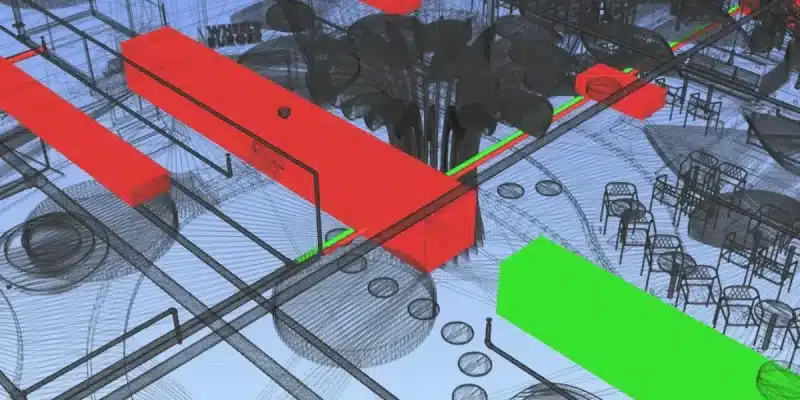
At its simplest, when you bring together different models (say, structural beams, HVAC ducts, electrical conduits) into a unified BIM environment, you need to check that they don’t interfere with each other. That’s what clash detection does.
Here is some context:
- A “clash” occurs when two or more elements occupy the same space or violate required clearances.
- With BIM, you can detect these clashes before construction begins rather than discovering them when someone hits a beam with a duct on-site.
- Tools such as Autodesk Navisworks, Autodesk Revit, Autodesk BIM 360, and others play a central role in this process.
Why It Matters: The Benefits
1. Cost & time savings
Resolving clashes in the digital model means fewer surprises on site, less rework, fewer change orders, and a more predictable budget. Some sources cite that rework can consume 5-15% of project cost; detecting clashes early reduces that margin.
2. Better collaboration and coordination
With a shared BIM model, architects, MEP engineers, structural engineers, and contractors can see how their systems interact and catch problems early. Clash detection acts as a communication tool, not just a technical check.
3. Improved schedule reliability
Avoiding on-site stop works due to a clash means fewer delays, smoother sequencing, and a more reliable handover.
4. Quality, safety, and sustainability gains
When systems fit together as intended, the finished building is more constructible, safer (with less on-site improvisation), and uses less waste.
Also, read the top 4 benefits of BIM Clash detection services if you are into core design and development.
Types of Clashes: What to Look For
- Hard clashes: Two elements physically collide (e.g., a beam passing through a duct).
- Soft clashes (clearance issues): Elements may not collide directly but violate maintenance or code clearances (e.g., pipe too close to access panel).
- Workflow/temporal clashes: The schedule or sequence causes conflicts (e.g., two trades scheduled to work in the same space at the same time).
How the Process Works: From Model to Resolution
BIM Model Creation & Aggregation
Each discipline builds its model (architectural, structural, MEP) in Revit or similar. Models are aggregated into a single federated model (in Navisworks, BIM 360, etc.)
Pre-Check & Quality Assurance
Before running clash detection, basic QC checks: naming conventions, element classifications, and coordinate alignment.
Clash Detection Run
Automated software tests checking relevant elements for interference or clearance violations. A “clash matrix” may define which disciplines to check and in which order.
Clash Log & Prioritisation
Detected clashes are logged, grouped, and prioritised (severity, cost impact, schedule impact).
Coordination & Resolution
Design teams collaborate: decide whether to offset one system, reroute another, or adjust design intent. Revisions are made in the source models; the updated federated model is tested again.
Final Verification & Reporting
Once no significant clashes remain (or all are resolved/accepted), the federated model is signed off. Reports are generated for the construction handover.
Know about the process of Clash Detection in BIM from here.
Best Practices for Maximising Value
To get the most from BIM clash detection services, consider the following pointers:
- Start early: Clash detection is most effective when used during design and pre-construction, not just before construction starts.
- Define clear clash matrices: Who tests with whom, what time, what rules. Helps keep things manageable.
- Use the right tool for the job: Revit for modelling, Navisworks or BIM 360 for coordination/aggregation.
- Maintain version control & coordination: Aggregated models and clash logs can get chaotic if not managed.
- Prioritise clashes: Not all clashes are equal small aesthetic interference vs a major structural/MEP conflict.
- Integrate into broader BIM workflow: Clash detection isn’t standalone should connect with scheduling (4D), cost (5D), and constructability reviews.
- Provide transparency to stakeholders: Reports should make sense to architects, engineer,s and contractors alike.
- Document resolution: Having a record of issues and how they were resolved helps future projects and facility management.
Also Read – How to resolve clashes using Revit Clash Detection Tool
Why Construction Firms Are Embracing It
As projects grow in complexity (tighter timelines, more prefabrication, more system integration), the traditional “fix it on site” approach becomes increasingly risky. In fact:
- Using 2D drawings and manual coordination means a higher danger that clashes are found too late.
- Firms that adopt BIM clash detection services gain a competitive edgefaster delivery, fewer defects, and better cost control.
For you as a construction professional, architect, or project manager: investing in solid coordination via clash detection means you’re building constructability into the project from day one rather than hoping it emerges on site.
From Our Perspective: What Makes High-Quality Clash Detection Services
When choosing a provider for BIM clash detection services, look for:
- Use of industry-leading software (Revit, Navisworks, BIM 360).
- Clear process & methodology (clash matrix, prioritisation, coordination logging).
- Strong collaboration across disciplines, with clean communication.
- Ability to tie clash detection into the full BIM workflow (modeling → coordination → construction).
- Track record of deliverables: clash reports, resolution documentation, and as-built coordination.
At CRESIRE, we offer end-to-end BIM services, including specialised Revit BIM clash detection services help you deliver conflict-free construction execution. Our teams leverage AutoCAD, Autodesk 3ds Max, and Autodesk Revit to ensure your federated models are thoroughly coordinated and ready for a smooth build.
With a deep understanding of AEC workflows, we help minimise rework, mitigate risk, and deliver projects on time and on budget.
Wrapping UP
In a world where every delay, every rework day, and every coordination mishap adds cost and erodes reputation/clash detection in BIM is no longer optional. It’s central to delivering smooth, predictable, high-quality construction.
By applying robust BIM clash detection services, especially those aligned with Revit modelling workflows, your team can lock in constructability early, build confidently, and hand over with greater certainty.
And when agility, precision, and collaboration are mission-critical, you’ll want a partner who knows the tools, the workflow, and the AEC ecosystem. That’s where CRESIRE steps helping you turn digital coordination into on-site execution.
Frequently Asked Questions - FAQs
At what stage should clash detection be implemented?
Ideally, during the design development or pre-construction phase, before major site work begins. Early detection = lower cost.
How many clashes are “too many”?
There’s no fixed number. What matters is the severity and impact. Prioritise high-impact clashes (structural/MEP) first, then lesser ones like aesthetic clearances.
Does clash detection eliminate all issues on site?
No process can guarantee zero surprises. Effective clash detection significantly reduces the big risks and helps you handle the smaller ones proactively.
What software do we need for clash detection?
A combination of modelling tools (like Revit) and coordination/aggregation tools (like Navisworks or BIM 360) is common. Our team uses AutoCAD, Autodesk 3ds Max, and Autodesk Revit.
Can smaller projects benefit from clash detection?
Absolutely. Even mid-size projects with multiple trades benefit from coordinated models. The ROI is higher when you reduce rework and accelerate delivery.

Devashish is Founder/Director at Cresire where he leads BIM services. He holds a bachelor’s degree in Civil Engineering from the University of Sheffield and an MSc in Construction Project Management from The University of the West of England. His vision behind CRESIRE is to provide BIM services, adhering to best practices and procedures, to global customers, helping customers to save extensive production costs and overruns.
Our Recent Projects on BIM Services

Related Posts