
While many firms search for direct solutions for POINT CLOUD TO CAD CONVERSION, the real value lies in understanding the complete workflow behind it. This guide explains the step-by-step process, technical considerations, accuracy factors, and when it makes sense to partner with professional SCAN TO CAD SERVICES instead of handling complex scan data internally

What is Point Cloud to CAD Conversion?
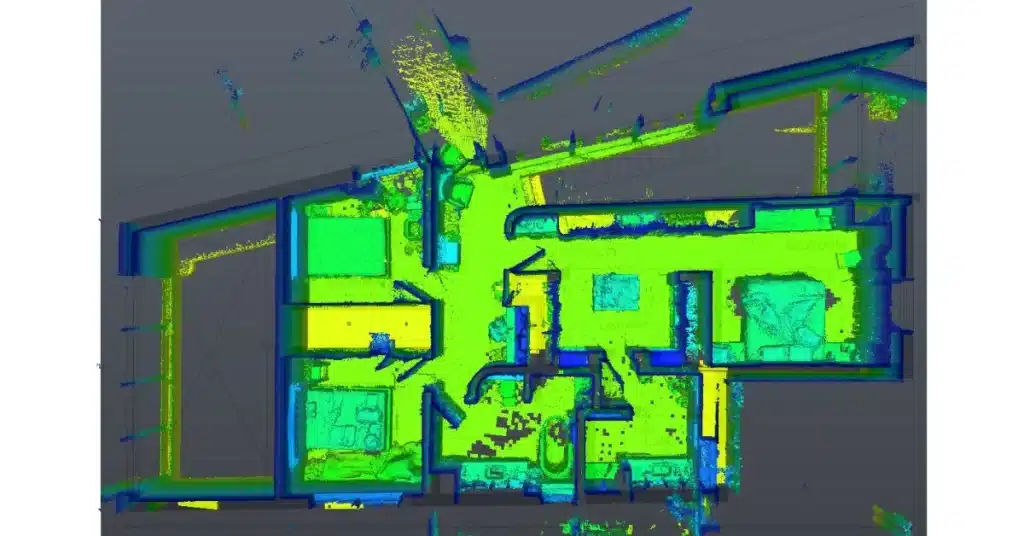
POINT CLOUD TO CAD CONVERSION is the process of transforming that scan data into structured 2D CAD drawings such as floor plans, elevations, reflected ceiling plans, and sections. Point cloud data consists of millions of spatial coordinates captured through 3D laser scanning or LiDAR. However, raw scan data is not directly usable for construction documentation.
For organizations that require construction-ready outputs, professional POINT CLOUD TO CAD SERVICES ensure accuracy, clarity, and compliance with drafting standards.
The Basics of Point Cloud to CAD Conversion
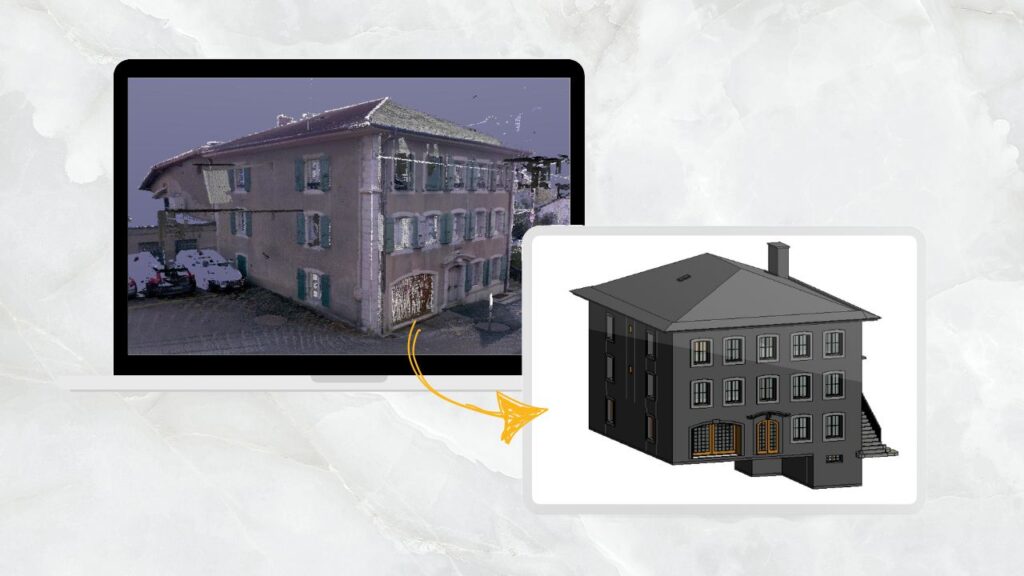
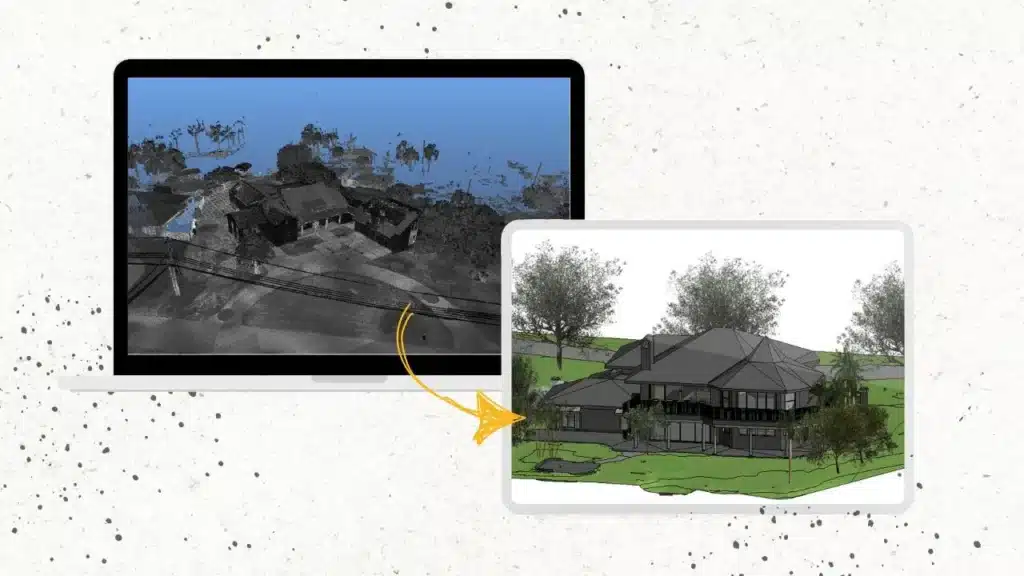
Point cloud to CAD conversion involves transforming 3D point cloud data, captured by 3D scanning devices, into 2D AutoCAD Drawing (DWG) format.
This process enables versatile usage, including accurate 3D model creation for architectural, engineering, and manufacturing needs.
The conversion process involves extracting relevant information from the point cloud data, such as the position, orientation, and dimensions of objects, and developing it into a CAD format that can be edited and manipulated using software such as Revit and AutoCAD.
This process is essential for creating accurate 3D models of real-world objects and environments and can be used in a wide range of industries, including construction, manufacturing, and product design.
- These scans are like an X-ray of the exterior and deep-seated design elements of the building that in turn are used by architects and engineers to develop 2D CAD designs.
- The CAD drawings are used for various purposes, such as creating accurate 3D Revit models for architectural, structural, MEP, or manufacturing applications.
- Point Cloud to CAD or 3D Scan to CAD Services is entirely a helpful technique for renovation construction projects. This allows AEC and Real Estate companies to develop and coordinate 2D designs and BIM models with project stakeholders.
While there are many applications for using Point Cloud to CAD Conversion, many construction professionals and companies still are not aware of the right implementation techniques of the scan to CAD on a construction project.
What are the Applications of Scan to CAD or Point Cloud to CAD Conversion?
Point cloud to CAD conversion has a wide range of applications in the construction industry, including:

1. Building Information Modeling – BIM
Point cloud to CAD conversion is an essential step in creating accurate BIM models of existing buildings.
By converting point cloud data into CAD format, Architects and Engineers can create detailed 3D models that accurately reflect the physical space.
2. Site Analysis
Point cloud to 2D Drawing conversion can be used to analyze construction sites and identify potential challenges or opportunities.
By converting point cloud data into CAD format, construction professionals can create 3D models of the site and use them to plan construction projects and identify potential conflicts with existing structures.
3. Design Verification
Point cloud to AutoCAD conversion can be used to verify the accuracy of the built asset. By comparing CAD designs created from point cloud data with the existing blueprints on the building, construction professionals can identify discrepancies and ensure that the construction work meets design specifications.
Existing building renovations or additions often require verification of existing conditions before design work begins.
Point cloud data can be imported as an underlay or reference object within AutoCAD. This allows architects and engineers to overlay their new designs on top of the existing building’s point cloud representation in AutoCAD.
4. Retrofitting
Point cloud to CAD conversion or scan to CAD can retrofit existing buildings with new mechanical, electrical, or plumbing systems.
By creating accurate 3D models of existing buildings, engineers can design new systems that fit within the existing space and minimize the need for costly modifications.
5. Accurate Measurements with Point Cloud
While AutoCAD offers traditional measurement tools, point clouds provide a much denser set of data points representing the actual geometry of a space.
By referencing the point cloud data within AutoCAD, BIM engineers can take advantage of these additional data points to obtain more accurate measurements for specific elements or areas within the existing building.
Furthermore, 2D AutoCAD Drawings can be used throughout construction for quality control. Any deviations can be identified and addressed promptly by comparing the as-built conditions to the model.
Software We Use for Point Cloud to AutoCAD Conversion?

The Process of Converting Point Cloud to AutoCAD

Point cloud to CAD conversion is a critical process in creating accurate 3D models for various applications, including construction, engineering, and product design. Here is a step-by-step explanation of the process:
1. Data Acquisition
The first step in the Point Cloud to AutoCAD conversion is to acquire 3D point cloud data. This data can be captured using various techniques, including laser scanning, photogrammetry, and structured light scanning.
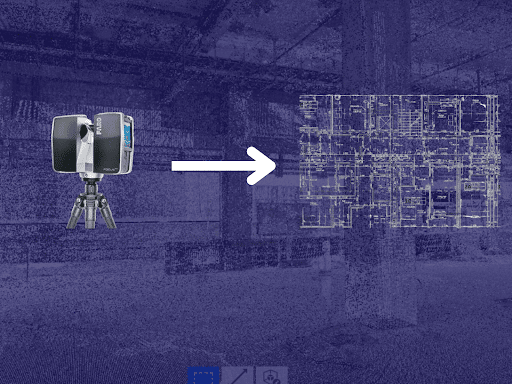
Point cloud data acquisition captures and records 3D information about a physical object or environment. This is typically done using specialized equipment such as laser scanners, structured light scanners, or photogrammetry systems.
These devices capture a large number of points in 3D space, which are then processed and organized to create a point cloud. This point cloud can use for a variety of applications, such as creating 3D models, performing measurements, or analyzing the object or environment. Overall, point cloud data acquisition is critical in making accurate and detailed 3D representations of the physical world.
2. Point Cloud Pre-Processing for Scan to CAD
Once the point cloud data is captured, it needs to pre-process to remove noise, outliers, and other artifacts. This process involves filtering the data, removing duplicate points, and aligning multiple scans if necessary.
Point cloud pre-processing is a necessary step in point cloud data analysis that involves cleaning and filtering raw data to remove noise, artifacts, and other unwanted elements.
This process prepares the data for further analysis and visualization by ensuring that it accurately reflects the object or environment being scanned.
Pre-processing techniques for Faro Conversion Cloud of Points in to CAD Drawings include noise reduction, outlier removal, and data decimation. Once pre-processed, the point cloud data can be used for a wide range of applications, such as creating 3D models, conducting measurements, and performing analysis.
3. Point Cloud Registration before Scan to CAD
If multiple scans were taken of the same object or environment, the point clouds need to register with each other.
This process involves identifying common features in the scans and aligning them to create a single, unified point cloud. Point cloud data registration is the process of aligning multiple point clouds captured from different viewpoints into a single, unified point cloud.

This process involves identifying common features in each point cloud, such as corners or edges, and matching them to one another. Registration can be done manually, but it is typically performed using algorithms that automatically align the data.
The output of the registration process is a single-point cloud that accurately represents the entire object or environment. This step is critical in creating an accurate 3D model from multiple point clouds.
Poor scan alignment can introduce cumulative dimensional errors. This is one of the most overlooked risks in DIY workflows. Experienced SCAN TO CAD CONVERSION SERVICES teams validate alignment before drafting begins, preventing downstream design issues.
4. Point Cloud Segmentation for Point Cloud to AutoCAD
After registration, the point cloud is segmented to identify individual objects or components within the scan. This process involves using algorithms to group points that belong to the same object or component.
Point cloud segmentation is the process of dividing a point cloud into smaller, meaningful segments or regions that correspond to specific objects or parts of an object.
This segmentation is done using algorithms that group points that belong to the same object or component, based on properties such as color, intensity, or surface normal.
Segmentation is an essential step in the 3D scan to 2D CAD drawing conversion, as it allows for the creation of accurate and detailed 3D models of individual objects within the point cloud.
5. Surface Reconstruction in Scan to CAD Conversion
Once the point cloud is segmented, a surface can be reconstructed using various techniques, including meshing, spline fitting, and surface fitting. This process involves creating a continuous surface that approximates the shape of the segmented objects.
Surface reconstruction is the process of creating a continuous surface representation from a set of points in a point cloud. This process is necessary for the point cloud to CAD conversion because CAD software requires a surface model to create a solid model. Surface reconstruction techniques include meshing, surface fitting, and spline fitting.
The output of surface reconstruction is a surface model that approximates the shape of the object or environment in the point cloud.
6. Point Cloud to CAD Conversion
The final step in the process is to convert the reconstructed surface into a CAD format. This involves importing the surface into CAD software and creating a solid model using features such as extrusion, revolve, and sweep.
Point cloud to CAD conversion requires advanced AutoCAD skills. Therefore it recommends that you hire a professional or partner with a point cloud to CAD conversion outsourcing company.
7. Quality Control
After the CAD conversion, the model needs to be checked for accuracy and completeness. This involves comparing the CAD model with the original point cloud data and making necessary adjustments to ensure that the model accurately reflects the physical space.
Quality control is a crucial step in the Scan to DWG conversion to ensure the accuracy and completeness of the resulting CAD model.
It involves comparing the point cloud to the CAD model, checking for errors or missing details, and making corrections as needed.
Quality control may also involve performing tests such as geometric accuracy, dimensional accuracy, and surface smoothness to ensure that the CAD model meets the required specifications.
Also Read, Common Challenges in Point Cloud to CAD Conversion
Benefits of Scan or Point Cloud to CAD

1. Precise Design Development
Precision is paramount in engineering and design projects, and Scan to CAD excels in this aspect. Laser scanning captures millions of data points. These data points create a highly accurate digital representation of the existing site or building conditions.
Scanning eliminates the need for manual measurements. This reduces errors and rework and saves significant time compared to traditional methods.
2. Safer Approach
Manually surveying a construction site requires surveying professionals visiting the risky areas that could potentially lead to accidents.
Using laser scanning, professionals do not have to enter these risky areas and it pretty much automates the surveying by capturing the accurate building conditions.
Scan to CAD also leads to improved planning amongst project stakeholders that helps them identify potential safety hazards before construction begins, promoting a safer work environment.
3. Advanced Facilities Management
Point cloud to AutoCAD drawings are valuable assets for facilities management. Facilities managers have access to as-built conditions of the building.
The converted CAD drawing provides a detailed and measurable record of the existing conditions. Facilities managers have the proper sheet work, annotations, and dimensions of the design elements/equipment present in this building.
Using these precise AutoCAD drawings, facilities management can effectively plan spaces and potential future renovations.
4. Cost Savings
Developing Scan to AutoCAD drawings can lead to substantial cost savings throughout a project. Streamlining processes and reducing errors minimizes the need for expensive revisions, rework, and alterations. Additionally, the efficient use of resources and improved project timelines contribute to overall budget optimization.
5. Streamlined Collaboration
Collaboration is key in today’s interconnected world, and Scan to CAD facilitates seamless teamwork.
Multiple stakeholders can access and work on CAD models simultaneously, regardless of their physical location. This fosters better communication and decision-making, ultimately leading to successful project outcomes.
Point Cloud to CAD vs Scan to BIM: What’s the Difference?
While Scan to CAD Conversion produces 2D drawings, Scan to BIM converts scan data into intelligent 3D Revit models containing parametric elements and metadata.
You should choose:
CAD conversion for renovation documentation and 2D drafting needs
Scan to BIM Services for facility management, clash detection, MEP coordination, and digital twin workflows
If your project demands detailed 3D modeling rather than 2D drawings, our Scan to BIM Services provide structured Revit models derived directly from point cloud data.
Why is E57 the most common format for Point cloud to CAD?
There are various formats including; E57, LAS, PTS, RC3, XYZ, etc. Out of them, E57 is the most common software preferred by AutoDesk users.
There are several different reasons:
1. Advanced Features
E57 has efficient storage capabilities and support for various point cloud properties beyond just XYZ coordinates.
This includes color information, intensity data, and other attributes captured during scanning. E57 also supports various point cloud properties.
2. Flexible Format
E57 is a vendor-neutral format. It is not tied to any specific software program. This feature allows for greater flexibility in the design and construction workflow, as the data can be easily transferred between different software environments.
3. Prospective for Future Industry Standard
With its advanced features and growing adoption, E57 has the potential to become a more prominent standard in the future. If your project benefits from additional point cloud properties and future-proofing your data, then E57 could be a compelling choice.
When Should You Outsource Point Cloud to CAD Conversion?
While small scan datasets can be managed in-house, outsourcing becomes critical when:
Scan files exceed several gigabytes
Multiple scan stations require complex registration
Tight deadlines are involved
Construction-level accuracy is required
Legacy building documentation must be recreated
In such scenarios, partnering with structured SCAN TO CAD SERVICES helps eliminate rework and ensures production-ready drawings.
Conclusion
Following the right methods for point cloud to CAD conversion or Scan2CAD is crucial for several reasons. First, using the correct techniques ensures that the resulting CAD model is accurate and complete, which is essential for applications such as engineering design and analysis.
Second, following the right methods can save time and resources by minimizing the need for manual corrections or rework.
Third, it can improve the efficiency and effectiveness of the entire design process by providing a detailed and accurate 3D model that can be used for simulations, prototyping, and visualization.
Finally, using the right methods can ensure that the resulting CAD model meets the required standards and specifications, such as dimensional accuracy and surface smoothness.
If your project requires precision drafting from laser scan data, our SCAN TO CAD SERVICES team ensures reliable, layered, and construction-ready CAD deliverables.
Frequently Asked Questions - FAQs
How does Point Cloud to CAD work?
Point cloud to CAD involves the conversion of 3D laser scans or point cloud data into CAD models using specialized software.
Is Scan to AutoCAD suitable for all industries?
Scan to CAD is versatile and can be applied across various industries, including architecture, manufacturing, and civil engineering.
Can Point cloud to AutoCAD be integrated into existing workflows?
Yes, Scan to CAD can seamlessly integrate into existing design and engineering processes, enhancing efficiency.
What are some popular Point cloud to CAD software options?
Popular Scan to AutoCAD software includes Autodesk Recap, Faro Scene, and Leica Cyclone.
Are there any limitations to Scan to CAD?
While Scan to CAD offers numerous benefits, it may require specialized equipment and expertise, making it less accessible to some organizations.
What is Point Cloud in AutoCAD
Point cloud in CAD is the process of generating 2D architectural, structural, and MEP plans and elevation drawings for renovation and facilities management.
Is point cloud to CAD conversion automated?
No. While software assists in visualization, drafting remains a manual interpretation process to ensure accuracy and proper layering.
How long does point cloud to CAD conversion take?
Turnaround depends on scan size and drawing complexity. A small residential scan may take a few days, while large commercial or industrial projects require structured production workflows through SCAN TO CAD teams.
Can point cloud data be reused later for BIM modeling?
Yes. The same scan dataset can be repurposed for Scan to BIM Services if 3D modeling is required in the future.
Related Posts

Our Recent Point Cloud / Scan to CAD Projects



Share Via

Devashish Sharma
Devashish is Founder/Director at Cresire where he leads BIM services. He holds a bachelor’s degree in Civil Engineering from the University of Sheffield and an MSc in Construction Project Management from The University of the West of England. His vision behind CRESIRE is to provide BIM services, adhering to best practices and procedures, to global customers, helping customers to save extensive production costs and overruns.
Recent Post
Our Services

A Project Case Study of a Warehouse